Algor: Generates visual study maps from textbooks and notes
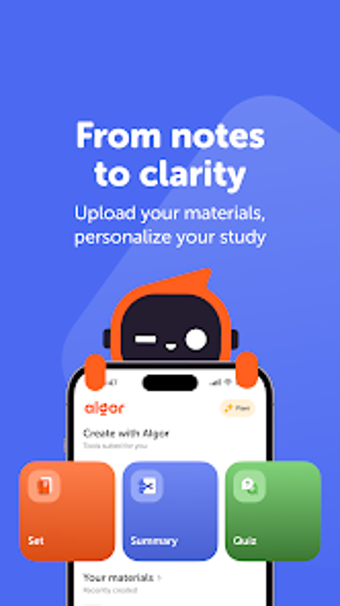
Algor: AI for studying by Algor is an Android education app designed to convert dense academic material into organized visual aids. It uses natural language processing to transform textbooks, PDFs, and personal notes into concept maps and concise summaries, and supports PDF uploads and OCR photo input. Built-in text-to-speech, collaborative editing, and customization tools let users tailor visuals. Intended for middle-school through university students and educators, it helps learners who prefer visual or auditory study methods.
What Algor does for dense academic material
Algor turns long-form text into structured concept maps and summaries. The app's AI Concept Map Generator accepts raw text and direct PDF uploads for automatic visualization, so users avoid manual outlining. The PDF-to-Map feature supports document import, and the tool processes text inputs into node-and-link layouts rather than plain linear notes. This makes it practical when a learner needs a graphic overview of a chapter or lecture notes.
How Algor supports comprehension and accessibility
Visual and audio conversion targets different learning needs. The tool generates detailed study maps in seconds according to its design, reducing time spent creating outlines. It includes text-to-speech audio synthesis and specialized fonts for readers with specific learning requirements, which helps learners who benefit from listening or clearer typography. These capabilities make the app relevant for students with dyslexia or those who prefer mixed-media study sessions.
Is Algor suitable for classroom collaboration?
Collaboration and cross-device work are built into the workflow. Collaborative Editing permits multiple users to edit the same concept map in real time, and cross-platform synchronization keeps content consistent between the Android app and the web interface. Those facts make the app usable for small group projects and teacher-created visuals, where several contributors refine a single study diagram together.
How flexible is content creation and export?
Input options and export paths address varied study workflows. OCR integration converts photos of printed pages or handwritten notes into digital maps, while customization tools offer layouts, colors, and multimedia embeds to adapt visuals to a subject. The app also exports maps as PDF or image files and supports multiple languages, including Italian, Spanish, French, and German, so learners can reuse or share materials across formats and languages.
Algor is a practical visual-study assistant with an online dependency
Algor is a practical option for middle-school to university students and educators who want faster visualization of complex material. One important limitation is that its AI processing requires an active internet connection, which restricts offline use. It suits learners seeking quicker conversion of readings into accessible visual and audio study aids, especially when group editing or cross-device access matters.
Pros
Automatically generates concept maps from text and PDFs
OCR converts photos of books and handwritten notes into digital maps
Includes text-to-speech and specialized fonts for accessibility
Real-time collaborative editing with cross-platform synchronization
Cons
AI processing and cloud sync require an active internet connection
Laws concerning the use of this software vary from country to country. We do not encourage or condone the use of this program if it is in violation of these laws. Softonic may receive a referral fee if you click or buy any of the products featured here.